CAROUSEL GUIDE
Instagram carousels in Canva: writing and editing
A sequence of slides works best when each one has a clear purpose. Start with the order of your ideas, then choose the design.
When to choose a carousel
A carousel brings several slides together in one post. Use it to explain a process, compare options or develop a story that needs context. A static post puts the message in one image; in a carousel, the relationship between slides is part of the reading experience. Adding slides without adding information simply makes the journey longer.
Choose one main question and answer it throughout the sequence. If the topic raises new questions that need a detailed explanation, save them for another post. Let the number of slides follow what you need to say, rather than filling a set number for its own sake.
LOOK AT THIS GUIDE'S PREVIEW
Give each card a purpose
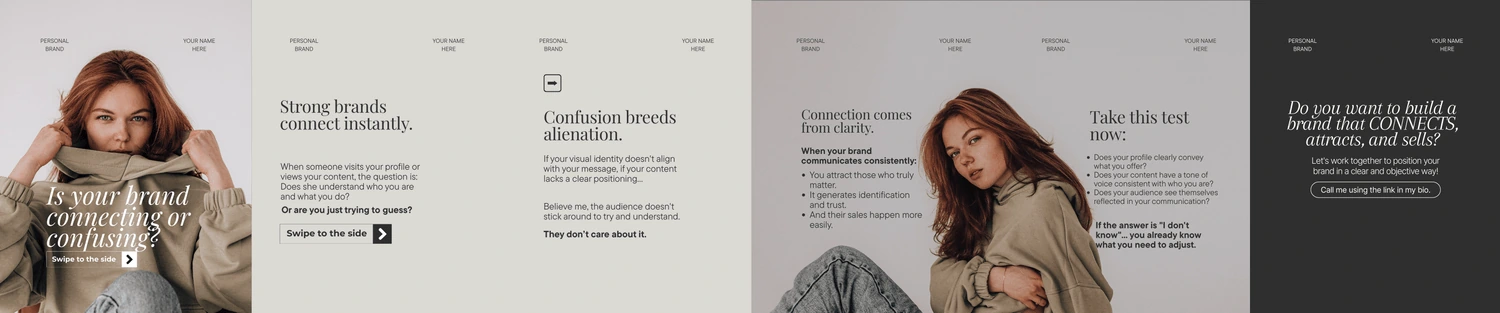
In the image above, the three cards use different compositions but follow the same theme. Notice what each headline does, in order:
01 · QUESTION
Does your brand connect or confuse?
The cover introduces a specific problem and invites readers to think about their own brand.
02 · MAIN IDEA
Clarity creates connection.
The second card answers the question with the idea that guides the message.
03 · INVITATION
Build a brand that connects.
The ending suggests a direction. The supporting text invites readers to tell their own story.
When adapting it: keep the question, answer and action connected. To teach a task, add a concrete demonstration between the answer and the invitation, as in the outline below.
Write before you design
Use this outline as an exercise in organizing ideas. The topic and copy below are teaching examples created for this guide; they do not represent a specific sequence sold in the collection.
- Cover, introduce the question. “Is your product photo too dark?” defines a situation the reader can recognize.
- Context, explain what to look for. “Check where the light is coming from before changing your camera settings.”
- Action, show something to try. “Move the product closer to a window and watch how the shadow changes.” Use your own image to illustrate it.
- Comparison, help readers assess it. Show two photos you took and explain what changed. Point out the difference without inventing a result.
- Conclusion, suggest the next step. “Try one position at a time and compare the photos.” The conclusion should match what you taught.
Bring the sequence into Canva
If you are still choosing colors and copy, see the template customization example. Get the first slide's message right before repeating the design on the others.
Open a carousel template and look at the purpose of each page: cover, text, photo or ending. Replace the sample copy with your outline, keeping the sequence in order. If an idea does not fit comfortably, rewrite it or continue the explanation on another slide. Avoid turning every page into a long paragraph.
Choose a consistent hierarchy: headline, explanation and small details. Repeat colors, margins and alignment where they help readers recognize the sequence. When changing a photo, check that the crop does not hide anything important. A decorative image should not appear to prove a result you have not demonstrated.
The Canva Instagram post maker offers customizable templates and the option to work with multiple pages. Use these options to adapt your content, and check in the editor which pages will be downloaded.
Review the flow from slide to slide
Read just the headlines, in order. Do they form a clear line of thought? Then check whether each page delivers what the previous one promised. Download the images and review the file sequence on your phone. Before publishing, check the selected slides and their order once more.
Creator Club templates work with free Canva. If a design includes optional premium elements, replace them, remove them or choose to purchase them through Canva. Also review names, sample copy and language: the final outline should be your own.
A quick check before publishing your carousel
- Compare the cover's promise with the conclusion: does the sequence deliver what it announced?
- Read the headlines without the paragraphs and check the flow of ideas.
- Open the exported files on your phone and check crops and text.
- In the final selection, confirm the order and remove duplicate slides.
Carousels in the complete bundle
Creator Club includes over 60 storytelling carousels, alongside templates, faceless videos and branding boards. Storytelling means organizing a narrative; you still need to add truthful information that fits your topic. Explore the previews and all the materials in the Creator Club offer.